A workspace for coding with agents

Agents write the code. You stay the author.

A desktop workspace for the coding agents you already use, in the repository you already have. Every line they write is named for the agent that wrote it, an editor keeps you in the code beside them, and as many agents as you like share one tree with nothing to merge.

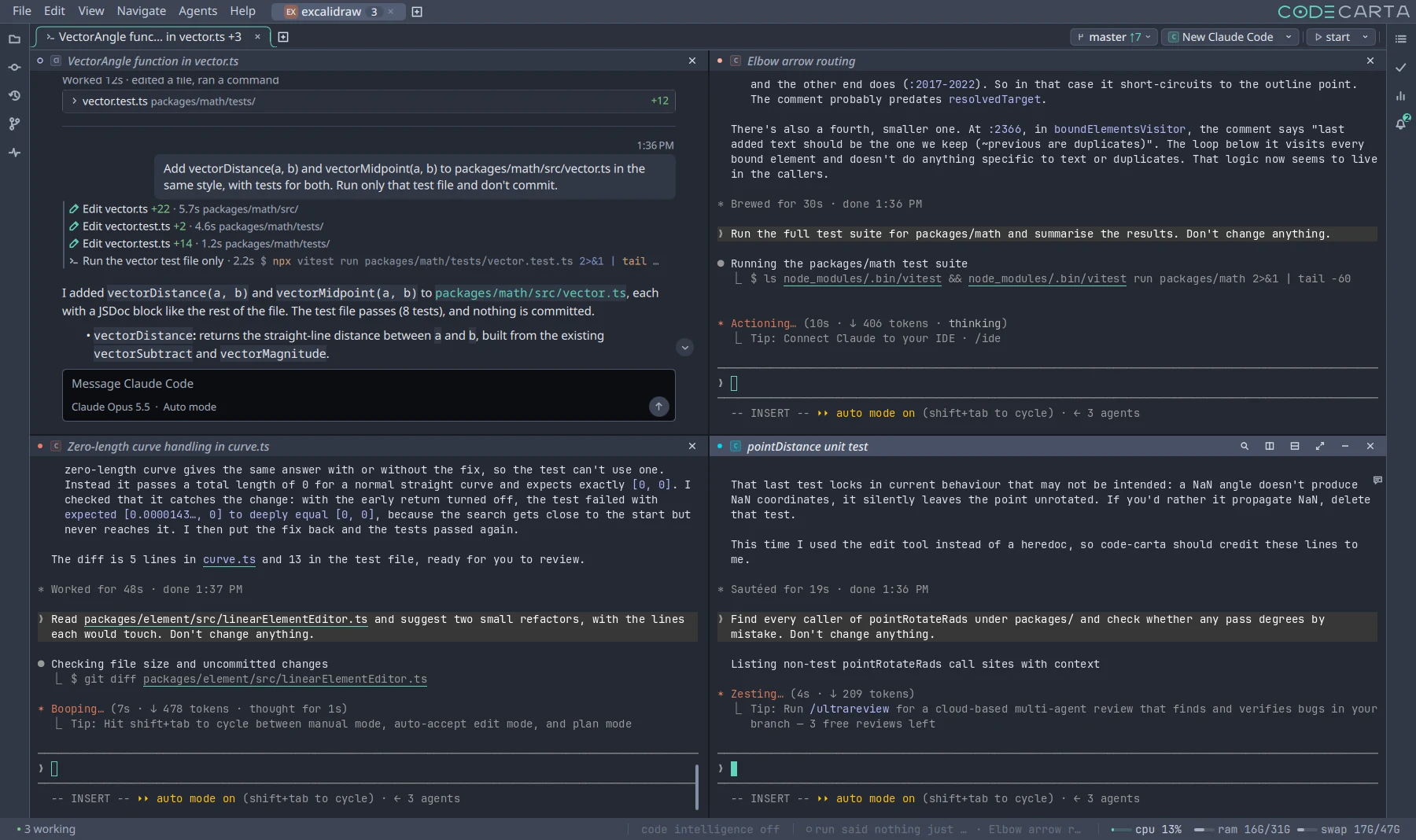
Four coding agents in one Code Carta window, three finishing todos and one writing a test, all in one checkout.
4,187tests across daemon, desktop and phone
20releases in the last thirty days
7agent vendors, one workspace
0network requests on the Free plan

Runs the agents you already use Claude CodeCodexGemini CLICopilot CLI GrokOpenCodeKilo Code

Every line, named

You know who did what

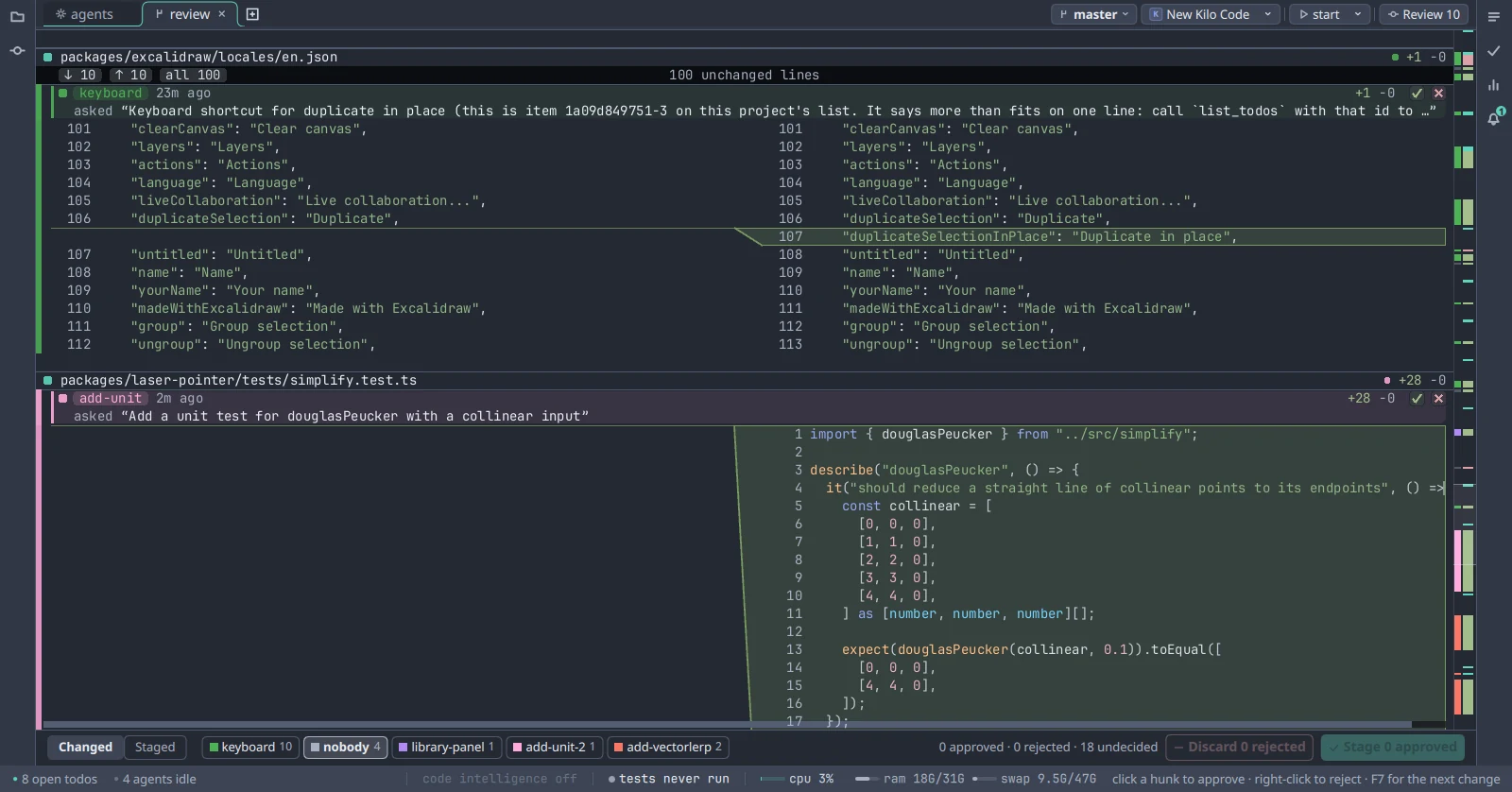
Ten files, four agents, one afternoon. Every change carries the agent that made it and the words it was asked. Nothing lands in your commit under your name on a guess.

How every line is named →
Code Carta's review showing changes across several files, each one labelled with the agent that made it and the words it was asked.
The editor

You never leave the code

An editor beside the agents, for reading what they did and making the small change yourself. A file path in their output opens at the line; the diff is one key away. Keep your IDE. This sits next to it.

See the editor →
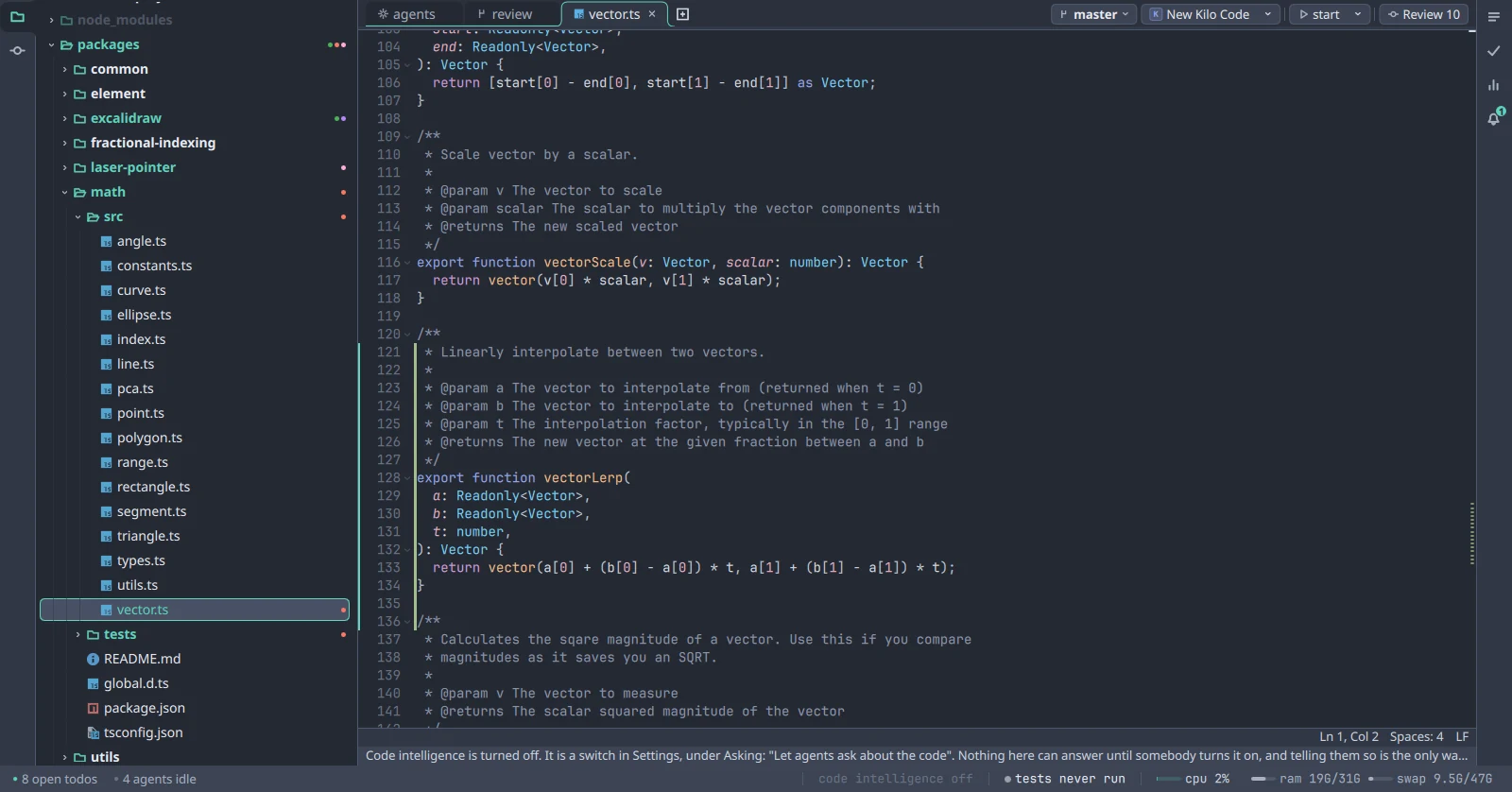
The file tree beside an editor showing a TypeScript file with a change bar in the gutter.
Parity engine

Several agents, one tree

Hand work to as many agents as you like, from whichever vendor. They all work in one checkout: no copies, no branch per agent, nothing to merge. Each commits only its own lines, and that is what makes it safe.

Hand out the work →
The project's todos, grouped under bug, feature, math, perf, ux and test, with four handed to agents.
Parity

How we can promise that.

Git stages by hunk, and two agents' lines written next to each other are one hunk. Parity's unit is the line. It knows which agent wrote each one, holds that through formatters, moves and renames, and refuses to guess.

Three agents, one file, no overwrites. Agents can see whose work is whose before they edit, so they do not write over each other's.

The editor

See what they did, in the code.

A file path in an agent's output is a link. Click it and the file opens at that line, with folding, change bars in the gutter, and language intelligence. The tree is on the left. The diff is one key away. It is the editor you read in and fix the small thing in, so that the agents' work stays yours to understand.

The file tree beside an editor open on vector.ts, with a change bar in the gutter beside the function an agent just wrote.
The function an agent wrote a minute ago, with a change bar beside it, opened by clicking its path in the agent's output.
Todos

Hand it to whichever agent you like.

Type #bug or #perf anywhere in the line and the todo files itself. Attach a screenshot from your phone and the agent gets it. Pick an agent from the menu and it starts. When it's done, the row is ticked and the commits it made hang off it, so the todos double as the change history.

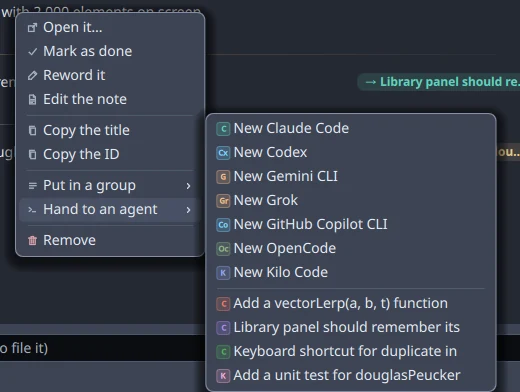
The row menu on a todo, open on Hand to an agent, listing Claude Code, Codex, Gemini CLI, Grok, GitHub Copilot CLI, OpenCode, Kilo Code, and the four agents already running.
Seven vendors on one menu, and the four agents already at work. Parity treats them all the same.
The phone

Still the author, away from the desk.

The same agents, on your phone, over an encrypted link to your own machine. See every agent across every project and what it is doing, answer the one that is waiting on you, and add a todo from wherever the idea arrived. The terminal is real: the keys an agent needs are a row above the keyboard.

App Store coming soon Google Play coming soon

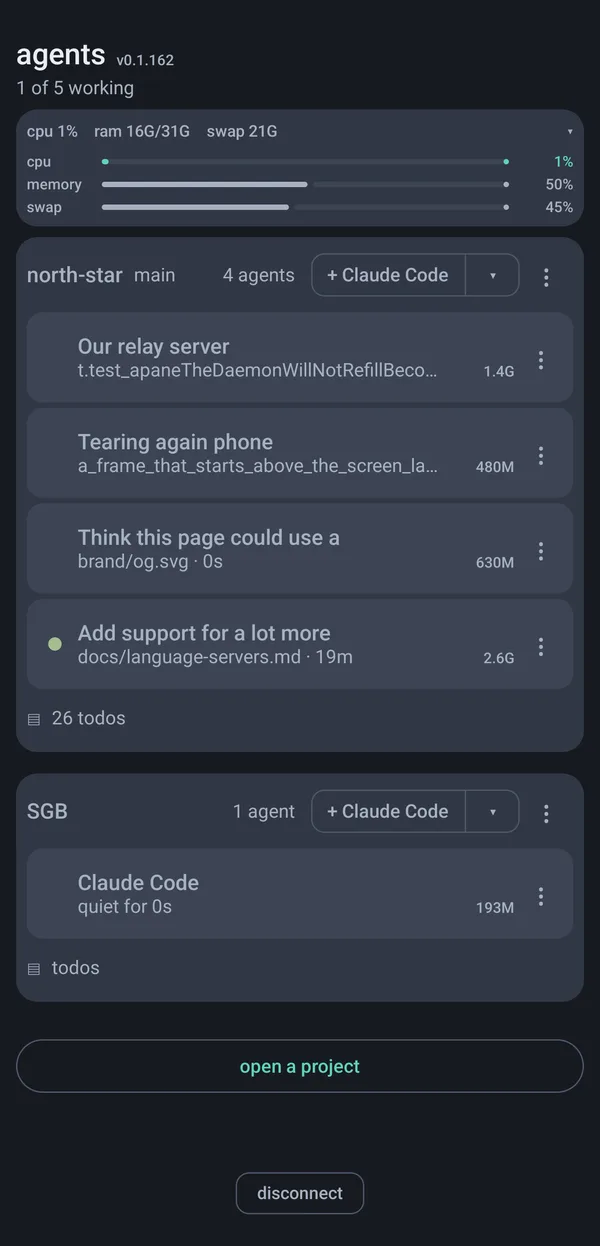
The phone app's agents screen: the machine's CPU, memory and swap, then two projects with their agents, each agent's memory beside it, and a button to add a Claude Code agent to either.
Every agent on the machine, by project, with what each is doing and what it costs in memory.
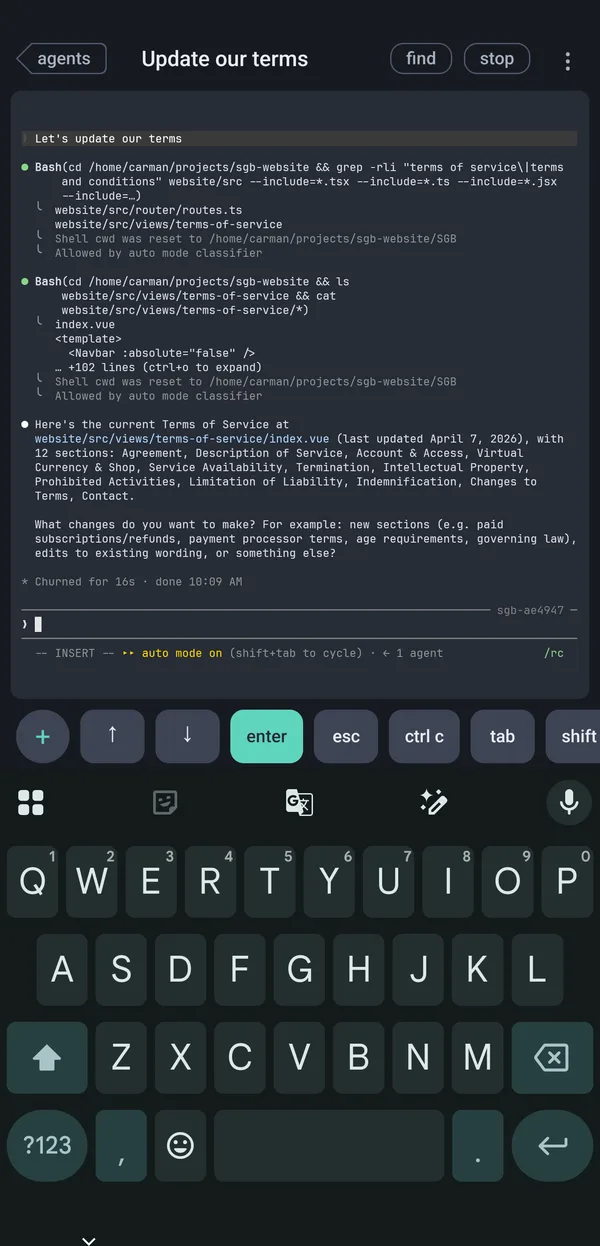
An agent's conversation on the phone, with a row of terminal keys above the keyboard: plus, arrows, enter, escape, ctrl-c, tab, shift.
One agent, mid-task, with the keys it might need above the keyboard.
Your code

We never see it.

Code Carta runs on your machine. Nothing of your project is stored anywhere else. Working on something nobody can know about is the ordinary case, not a plan tier.

  • The Free plan makes no network requests. None.
  • A paid plan sends a licence token about once a week. Nothing else: no file names, no paths, no usage.
  • Your agents talk to their vendor with your credentials. We are not in that connection.
  • The phone link is encrypted end to end with a key made on your desktop. Our relay carries ciphertext and keeps no record of it.

The one exception is a bug report you choose to send, which carries your logs. It says so before you press it. The whole policy is one page.

Two agents, free, for as long as you like.

No account. Nothing leaves your machine. Runs the agents you already pay for, and keeps the code yours.

The engine

Parity

Our proprietary engine for knowing who wrote which line. It is what lets several agents share one tree with no copies, no merge, and no line in the wrong commit.

Live
A review across several files, every change labelled with the agent that made it.
A real session in the Excalidraw repository. Four agents, ten files, every change named and the words it was asked with. Nothing staged, nothing edited.
Line by line

Line by line.

Git stages by hunk, and two agents' lines written next to each other are one hunk. Parity's unit is the line, and it holds that through the things that normally lose it.

Run a formatter, move a function, rename a file, delete a block, close the agent that wrote it. Every line still knows who wrote it.

Certainty

It does not guess.

Parity distinguishes a line it can prove from a line it cannot, and never quietly treats the second as the first.

What that means for you: nothing lands in your commit on a guess. If parity is not certain, you hear about it before the commit, not after the branch fails to build.

The rule

When it cannot tell, it says so.

Get this wrong in one direction and somebody else's half-finished work goes into your commit under your name, which you discover when the branch will not build. Get it wrong the other way and it costs someone a single decision. Parity is built to only ever make the second mistake, and to name what it held back and why.

Promises

What parity promises.

Your commit contains your work

Commit from inside Code Carta and you take your own lines, not everyone else's who was in the file.

Nothing is attributed on a silent guess

Where ownership is uncertain, you are told, and the work waits to be claimed.

A formatter cannot steal a file

Rewriting whitespace does not move authorship to whoever ran it.

Work outlives its agent

Close an agent mid-task and its uncommitted lines stay findable, named, and yours to keep or drop.

You are told when a file moves under you

When another agent changes a file you are in, you get its name, not a mystery.

Every change has an answer

Committable, claimable, or refused with a reason. Nothing is left in limbo with nobody told.

Trust

How we know it holds.

A test written by a person catches the mistakes that person already imagined. For something deciding who owns your work, that is not enough.

So parity is checked continuously in real repositories. That is why the promises above are stated as promises.

Pricing

One price, whatever your agents get up to.

Code Carta sits alongside whichever coding agents you already pay for. It is not in your model calls, so it does not meter them. No token charges, no per-agent seats.

Plans

Free

$0
  • Two agents at a time
  • The whole parity engine
  • Review, todos and editor
  • No time limit, no account

Pro

$10 per month
  • Unlimited agents
  • The phone client
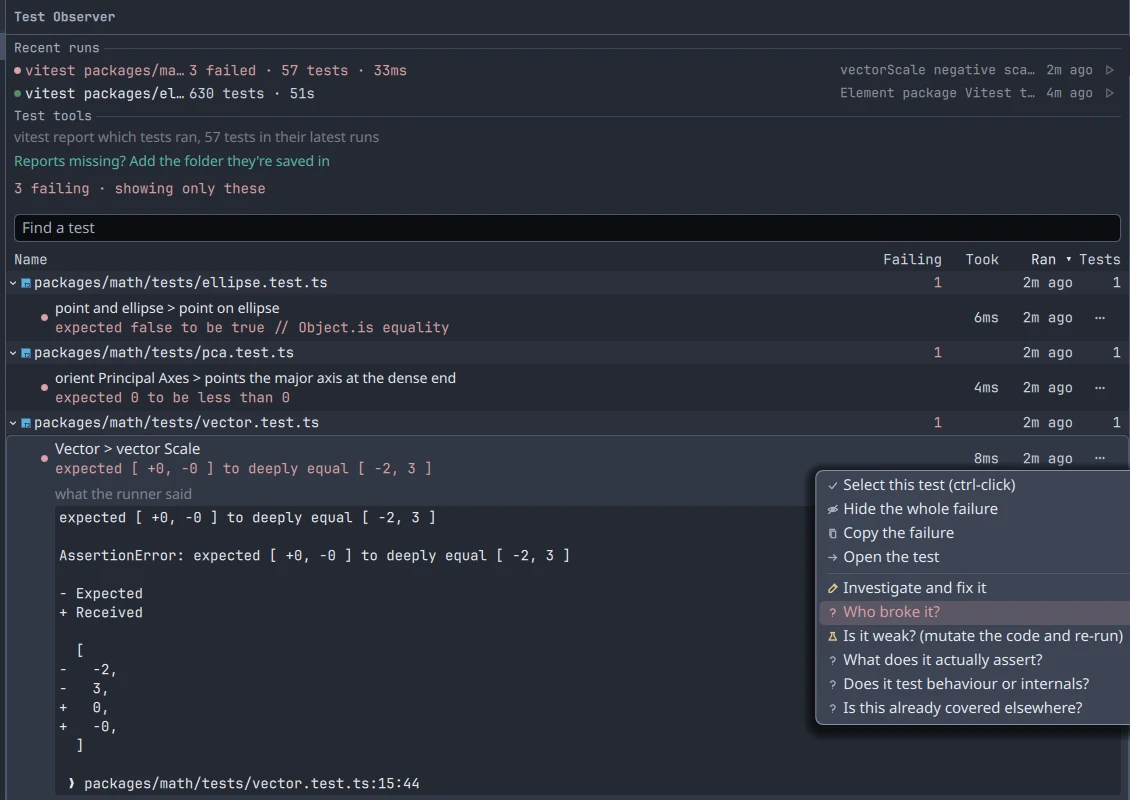
  • Test evidence and coverage in the review
  • Language servers installed for you, one click

Founding

$79 per year
  • Everything in Pro
  • Held at this price for as long as you keep it
  • First release year only

In early access. Paid plans go on sale at launch. Every download today is the Free plan. The founding price is held for as long as you keep the plan, and is offered during the first release year only.

Downloads

Where it runs.

Every build is on the download page, with its checksum.

Windows x64

Installer or portable

An installer that needs no administrator, or a zip that writes nothing outside its own folder.

Linux x86-64

Tarball and a script

Everything beside the binary. One script adds a desktop entry, per user by default.

macOS

Coming soon

The client already runs there. What remains is signing and notarisation.

iPhone and Android

The companion app

Watch every agent, answer the one that is blocked, and add a todo from your phone. On the App Store and Google Play at launch.

On your machine

Nothing leaves.

Remote access is off by default

Until you turn it on, nothing listens, nothing is advertised on your network, and nothing is dialled out. Turning it off again forgets the pairing key rather than leaving one lying around.

No analytics, no crash reporter

Nothing of the kind is wired into the product. Logs are local files.

Your agent's traffic is yours

Agents run in a terminal with your credentials. We are not in that connection and not in your token bill.

Download

Coming soon.

Free. Two agents, the whole parity engine, no account.

Elsewhere
macOS

Coming soon

The client already runs there. What remains is signing and notarisation.

iPhone and Android

The companion app

Ships with the Pro plan: watch every agent, answer the one that is blocked, and add a todo from your phone.

App Store coming soonGoogle Play coming soon

Docs

What is not obvious.

Seven things you would not find by clicking around. Nothing else needs a page.

Tasks Todos What agents can ask Code intelligence The phone Licensing a computer Where things are

Tasks

Your project's commands, as buttons.

The play chip in the band, named for the task it will run. Its menu lists what the project already defines. Press one and it runs in a pane, like an agent. With nothing to run it says Add a task.

  • Read from the project root: a justfile, package.json scripts, Cargo.toml, and .PHONY targets in a Makefile.
  • A justfile that yields tasks hides the other three, so one command is one button.
  • Cargo offers build, test, check, and run only. Never fmt or clean.
  • Missing just? The chip says "Install just" and links to it.

Your own, and pinning

.code-carta/tasks.toml. Only run is required. Name a discovered id to rename it, pin it, or hide it.

[[task]]
id = "user:deploy"
label = "Deploy"
run = "just site"

[[task]]
id = "just:test"
pinned = true

Pinned tasks get their own button in the band. Pin from the chip's menu; it writes the same stanza for you.

Todos

One line. Type it, hand it off.

  • Add: type in What needs doing? and press Enter. That is the whole form.
  • Group: put #bug or #perf anywhere in the line. The word comes out of the title and becomes the group.
  • Attach: a screenshot from the phone, or Attach… on the row. Drop or paste a file anywhere on the card. The agent gets the path.
  • Hand off: row menu, Hand to an agent, pick one. It is typed into that agent's terminal, not sent. You press Enter there.
  • Order: drag. Drop under a heading to file it there too. Ticking is the only way a row moves to Finished.
  • Afterwards: commits the agent makes hang off the row. A ticked box still answers "what changed".

Lives in .code-carta/todos.json in the project. Every window and the phone read the same file.

What agents can ask

The questions an agent can put to the tree.

Registered with each agent on install. They are why an agent says "parity refused" instead of committing your colleague's work.

  • Who wrote these lines? Including uncommitted work, which git blame cannot see.
  • Did anything change under me? Since its turn began, and by whom.
  • What have I changed? Its own files and lines, nobody else's.
  • Who else is here? Every agent in the project and what each is in the middle of.
  • Commit mine. Its own lines, through an index of its own. Refused, with the reason, when a line cannot be honestly separated.
  • Todos. Add one, describe one, finish the one it was handed.

An agent that was handed a todo has its commits attached to it automatically.

Code intelligence

Off until you turn it on.

  • Settings › Asking › Let agents ask about the code. With it on, agents can ask where a name is defined, everywhere it is used, and what the compiler thinks of a file.
  • The status bar says code intelligence off until then. That is why nothing resolves.
  • Language servers are not bundled. Settings › What this project is written in lists what is installed and offers the rest. The button shows version, size and licence before you press it.
  • Nothing downloads on its own.
The phone

Pair once. Off by default.

  • Settings › Reaching this machine from a phone › Pair a phone. A QR code appears. Scan it in the app.
  • Until you do, nothing listens and nothing is advertised.
  • Outside your network the two connect through our relay, encrypted end to end with the key from the QR. The relay sees ciphertext.
  • Unpair forgets the key. Every phone loses access at once.
  • Keep agents running after the window closes: Settings › Away from this machine.
  • iPhone and Android. Part of Pro.
Licensing a computer

Sign in once per machine.

  1. Settings › Your plan › Sign in. Your browser opens the account page.
  2. Say yes. The desktop shows the plan within seconds and renews it on its own.
  3. No browser on that machine? Paste an unclaimed seat's code into the same place.

A seat is one person on any number of their own computers. Offline, a plan keeps working for thirty days.

Where things are
Project list and tasks.code-carta/ in the project. Commit it or ignore it; both work.
SettingsLinux ~/.config/code-carta/. Windows %APPDATA%\code-carta\.
LogsLinux ~/.local/state/code-carta/. Windows %LOCALAPPDATA%\code-carta\.
Report a bugHelp › Report a bug. Sends the logs with your words. Kept thirty days.
Crash on startRun once with CARTA_DEBUG=1 and send what it printed.

Support

Help, from the people who wrote it.

One address, support@codecarta.com, read by the engineers. We answer within two business days, and a security report within one.

Report a bug

The fastest route is inside the app.

On the desktop, open Help, then Report a bug. On the phone it is Send a screen report. Either one sends the logs with your words, and the card tells you what is in them before you press it. Reports are kept for thirty days and then deleted.

By email, include four things and we can usually answer from them alone:

  • The version, from HelpAbout, and your platform.
  • What you did, what you expected, and what happened instead.
  • Which agent was running, and from which vendor.
  • The log. On Linux it is under ~/.local/state/code-carta/; on Windows under %LOCALAPPDATA%\code-carta\.

A crash on start: run it once with CARTA_DEBUG=1 set and send what it printed.

Request a feature

Tell us what you were trying to do.

Email with Feature in the subject. The most useful request describes the moment you reached for something that was not there, rather than the control you imagined. Every one gets an answer, and the answer says whether it is planned.

Security

Found something? Tell us first.

Email with Security in the subject and we reply within one business day. We will not take action against good-faith research, we will credit you if you want to be credited, and we will tell you when the fix ships. Nothing in the software listens on a network until you turn remote access on, and nothing dials out on the Free plan; if you find that to be untrue, that is exactly the report we want.

Billing

Plans, seats and charges.

Sign in on the account page to see your seats and codes. To cancel, or with a question about a charge, email from the address on the account. Our refund policy is short: fourteen days on any first payment, no reason needed.

Before you write

The Free plan needs no account

Download, run, open a repository. Nothing to sign up for and nothing leaves your machine.

Offline is fine

A paid plan keeps working for thirty days without reaching us, then returns to Free until it can.

Agents are yours

Code Carta runs the agents you already have, with your credentials. Your token bill and your vendor account are untouched.

Parity refused a commit

It says why, by file and by agent. What parity guarantees explains every refusal it can make.

About

We build the tool we needed.

Running several coding agents at once broke the one assumption every version control system makes: that a change belongs to a person, and that the person knows which change is theirs.

The problem

An agent committed somebody else's work.

It staged the files it had touched. Those files also held another agent's half-finished tests. It pushed a branch that did not build.

Nobody was careless. git add takes whole files, and there was no way to ask for less. Every tool in this space answered that by giving each agent a private copy of the repository and handing you the merge. We thought the answer was to make the smallest unit smaller. Parity is that answer.

In numbers
Dailyreleases, every working day
3platforms, desktop and mobile
4,187tests across daemon, desktop and phone
What we believe

Three positions we will defend.

A tool that guesses about ownership is worse than one that asks

Confidently attributing work to the wrong author is the failure that costs people their afternoon.

Isolation is a workaround, not an architecture

Copying the repository for every agent solves the easy half of the problem and makes the runtime half worse.

Claims should be checkable

Every number on this site is a measurement, not a projection.

Terms of service

The terms you use Code Carta under.

Code Carta is made and sold by CJB Software LLC. Downloading, installing or paying for it means you agree to these terms. They are written to be read, and they say what the rest of this site says.

Last updated
The software
Money
Limits
The rest

Privacy policy

Nothing leaves your machine unless you send it.

This page lists every way Code Carta or this site can come to hold something about you. It is short because the list is short.

Last updated
The software
Accounts
Your rights

Account

One moment.

Checking whether you are signed in.

Refund policy

Try it free first. Then the rules are simple.

The Free plan is the trial, and it never ends. If you paid and it was a mistake, here is what we will do.

Last updated
The rules
How